
How to Sit Correctly at a Desk for 8–10 Hours

Introduction
Desk-based work for long hours is common among office professionals, freelancers, and students. However, incorrect sitting posture for extended periods can lead to neck pain, lower back pain, shoulder stiffness, eye strain, and reduced productivity. Maintaining proper sitting posture and healthy work habits is essential for long-term spinal health and overall well-being.
Ideal Chair and Desk Setup for Long Sitting Hours
Start with a properly adjusted workstation to support your body and maintain correct sitting posture.
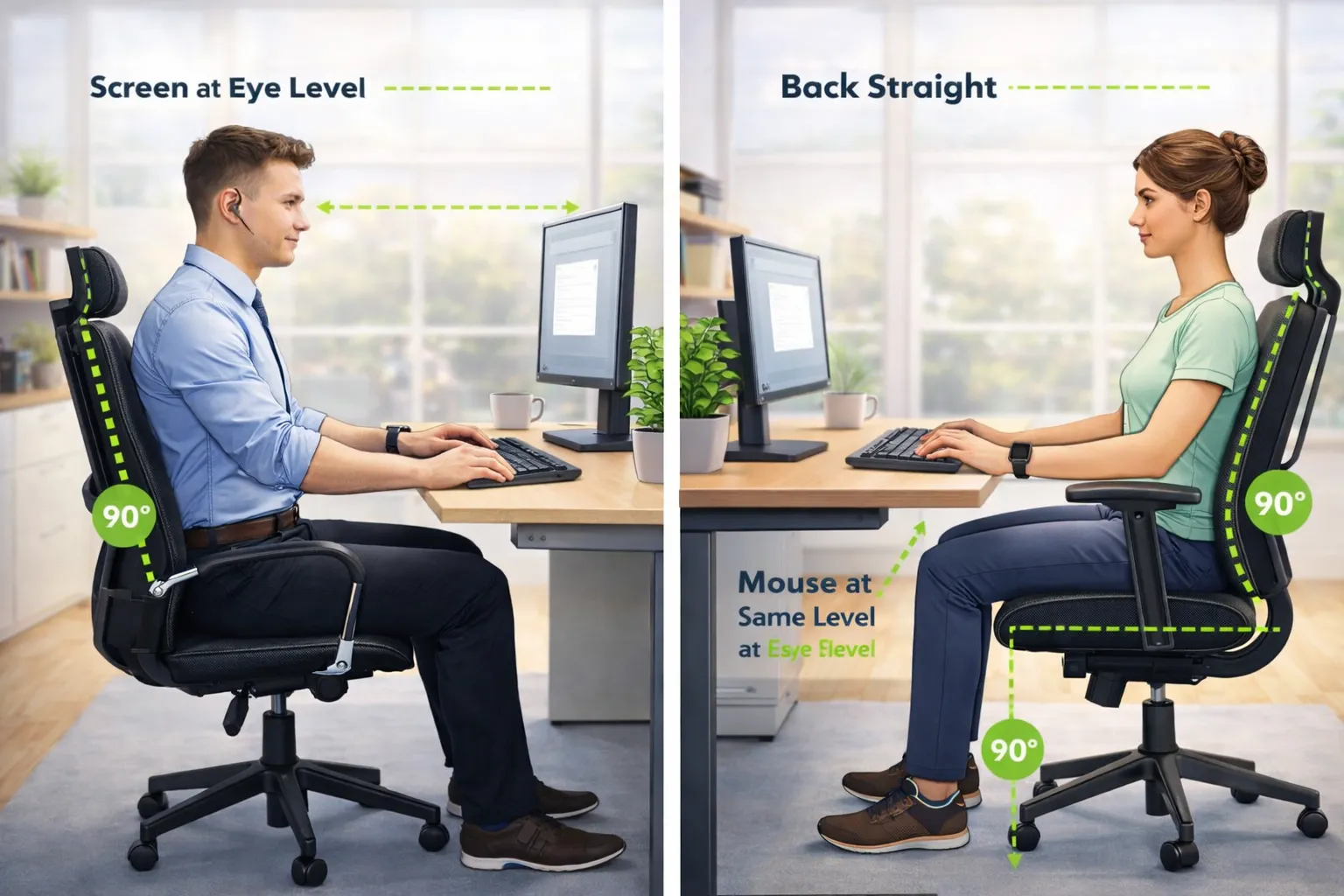
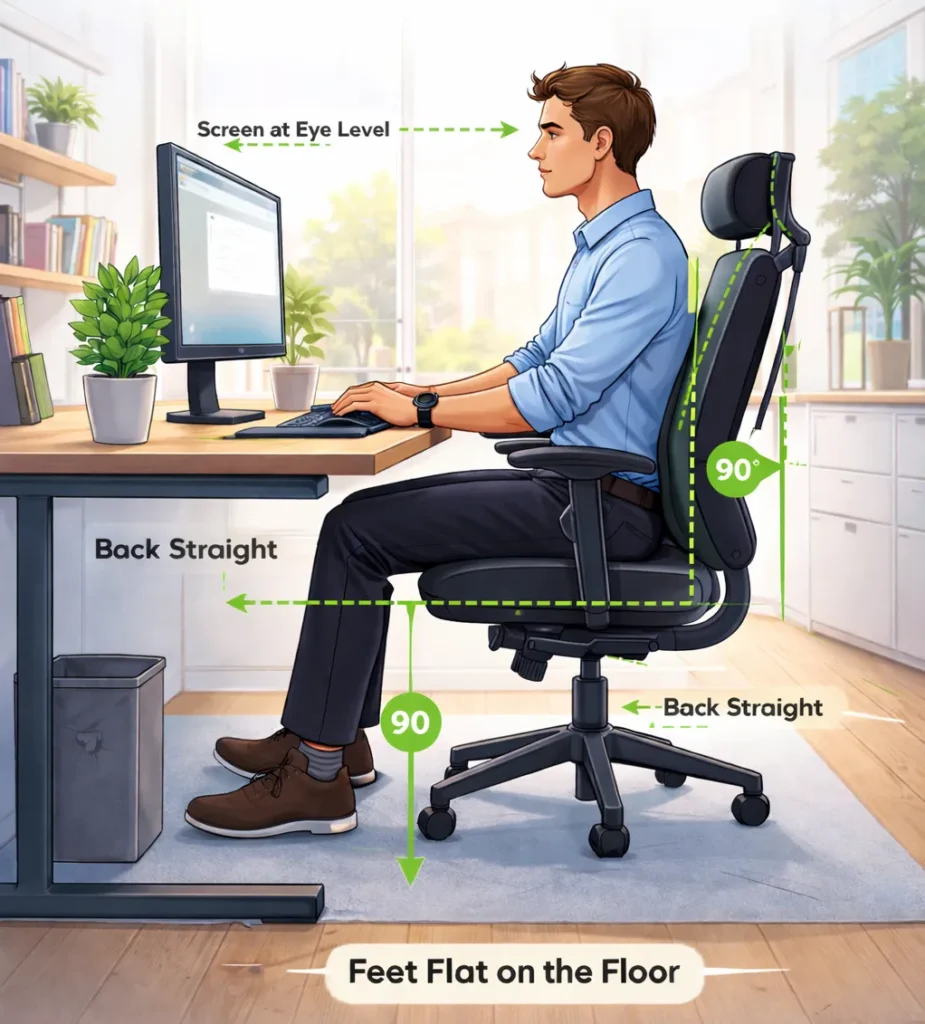
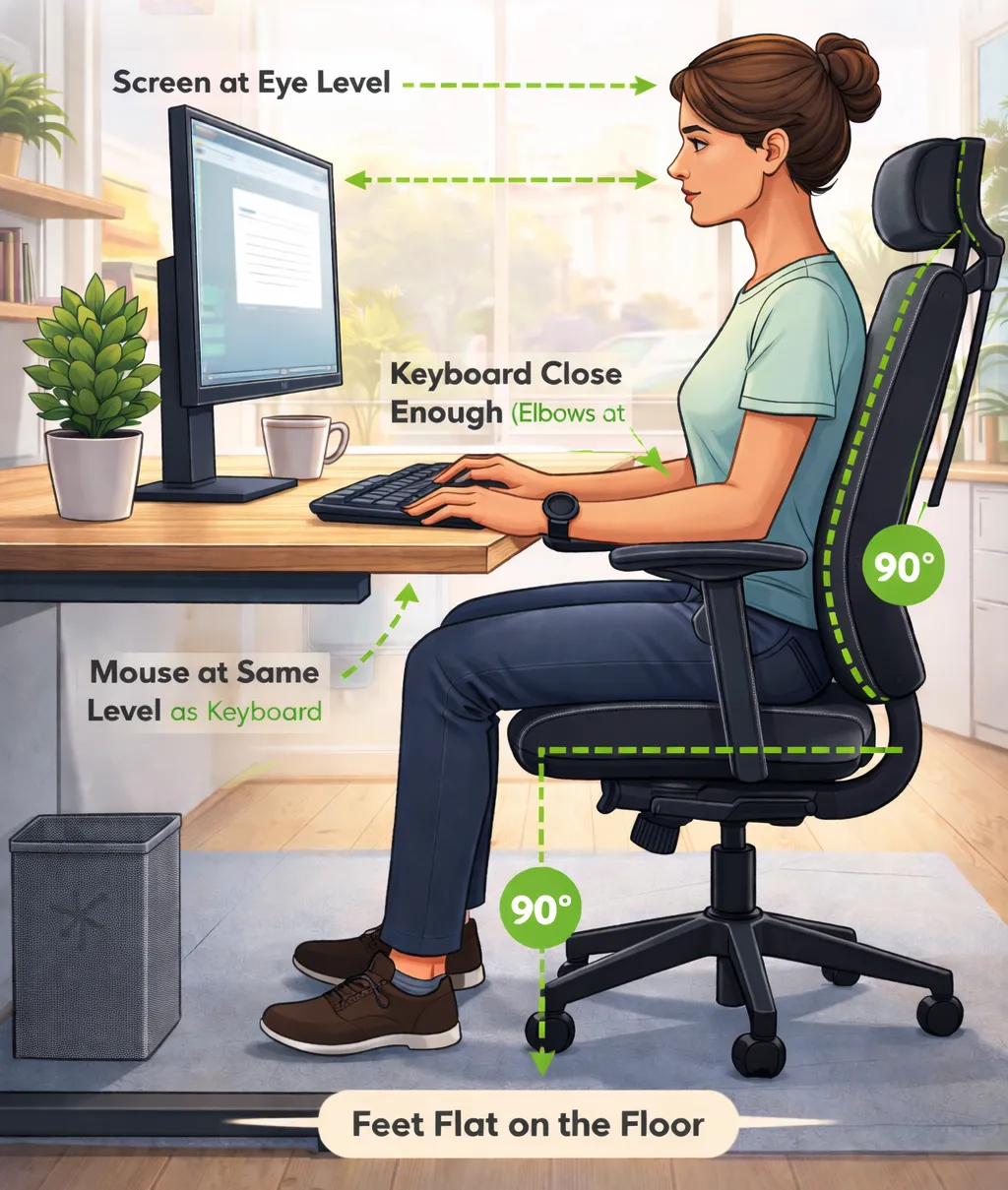
➊ Adjust your chair so your feet are flat on the floor and your knees form a 90-degree angle.
➋ Use a lumbar cushion or rolled towel if your chair lacks proper lower back support.
➌ Sit back fully in your chair to use the backrest and lumbar support effectively.
➍ Set your desk at a height where your elbows rest comfortably at your sides, keeping your forearms parallel to the ground.
Avoid dangling feet or crossing your legs for long periods, as this increases lower back strain and promotes poor sitting posture.
Sit long hours? Use an ergonomic chair with lumbar support to reduce back pain.
✪ Explore recommended ergonomic seating options:
Correct Screen, Keyboard, and Mouse Positioning
Proper equipment placement helps prevent neck pain, wrist pain, and shoulder strain.
❶ Position your computer screen at eye level and about an arm’s length away to keep your head aligned with your spine.
❷ Keep the mouse close to the keyboard, allowing your elbow to stay close to your body, reducing wrist and shoulder stress.
❸ Use a laptop stand if needed to maintain proper screen height.
❹ Place the keyboard so your wrists remain straight and your fingers can reach the keys comfortably.
A laptop stand helps maintain eye-level screen positioning and reduces neck strain.
✪ View recommended laptop stand options:
Sit Upright, Not Leaning Forward
Many people lean forward unconsciously while working at a desk.
● Keep your ears aligned with your shoulders.
● Do not hunch your upper back.
● Relax your shoulders; avoid raising or tensing them.
Imagine a string gently pulling you upward from the top of your head to maintain a neutral spine posture.
Importance of Regular Movement and Stretching
Even correct posture can cause discomfort if held for too long.
Follow the 20-8-2 rule:
● Sit for 20 minutes
● Stand for 8 minutes
● Move or stretch for 2 minutes
This routine helps reduce muscle stiffness, improves blood circulation, and keeps your body active. Simple movements like neck tilts and shoulder rolls are highly effective for desk workers.
Take Regular Micro-Breaks
Short, frequent breaks are essential during long working hours.
● Stand up every 45–50 minutes
● Walk for 4–5 minutes
Regular movement improves blood flow and helps prevent muscle tightness and fatigue.
Practice Desk Exercises
Simple desk exercises can greatly improve comfort, flexibility, and posture.
● Neck rotations
● Wrist stretches
● Seated spinal twists
● Shoulder rolls
Just 2–3 minutes of desk exercises every hour can make a noticeable difference.
Using simple tools such as a hand gripper can support wrist strength and reduce hand fatigue during desk work.
✪ See recommended hand grippers:
Maintain Eye Health During Long Sitting Hours
Extended screen time can cause digital eye strain.
● Blink frequently to prevent dry eyes
● Adjust screen brightness and contrast for visual comfort
● Every 20 minutes, look at something 20 feet away for 20 seconds
Research & Expert Insights
✦ A study published in the Journal of Physical Therapy Science found that proper sitting posture combined with regular movement significantly reduces neck and lower back pain in desk workers.
✦ Ergonomics experts recommend changing posture or moving every 30 minutes to reduce spinal load and muscle fatigue.
According to the World Health Organization (WHO), prolonged sitting increases the risk of musculoskeletal disorders and poor metabolic health.
Conclusion
Sitting for 8–10 hours a day may be unavoidable for many professionals, but pain and discomfort are not. By maintaining proper posture, setting up your workstation correctly, and taking regular breaks, you can protect your spine, improve focus, and enhance overall health.
By learning how to sit correctly at a desk for long hours, you can reduce pain and improve productivity.
✦ Good posture is not a one-time fix — it’s a daily habit.
Helpful Resources
✪ Use a foldable laptop stand for better comfort and posture.
✪ Blue Light Glasses for Eye Protection
✪ Desk exercises for back stiffness
✪ Yoga Exercises for Back Relief
✪ Posture Improvement Tips
✪ Best Posture Corrector Guide (2025)
FAQs
What is the correct sitting posture for working 8–10 hours at a desk?
The correct sitting posture for long desk hours includes keeping your back straight with lumbar support, feet flat on the floor, knees at a 90-degree angle, and the computer screen at eye level. Maintaining a neutral spine posture helps prevent back and neck pain.
How often should I take breaks when sitting for long hours?
Experts recommend taking a short break every 30–45 minutes. Standing, stretching, or walking for 2–3 minutes helps improve blood circulation and reduces muscle stiffness.
Does a laptop stand really help reduce neck pain?
Yes. A laptop stand raises the screen to eye level, helping maintain proper neck alignment and reducing forward head posture, which is a common cause of neck pain.
What are the best desk exercises for office workers?
Effective desk exercises include neck rotations, shoulder rolls, wrist stretches, and seated spinal twists. Performing these exercises for 2–3 minutes every hour can significantly reduce stiffness.
How can I prevent eye strain while working on a computer?
To prevent digital eye strain, follow the 20-20-20 rule, blink frequently, and adjust screen brightness and contrast. Using anti-glare screens or blue-light glasses may also help.
Can sitting incorrectly for long hours cause long-term health issues?
Yes. Poor sitting posture over time can lead to chronic back pain, neck stiffness, poor circulation, and musculoskeletal disorders. Correct posture, ergonomic tools, and regular movement are key to long-term health.
View Recommended Posture Correction & Support Tools
Disclosure: This page may contain affiliate links. If you choose to purchase or enroll through these links, we may earn a small commission at no extra cost to you.
Disclaimer: The information provided on this website is for educational purposes only and should not be considered medical advice. Please consult a qualified professional before starting any new yoga or wellness practice.

Ajay Jaswal is the founder of Fitness Dose Club, where he shares beginner-friendly guides on posture improvement, fitness training, and responsible supplement use. His goal is to make healthy living simple, practical, and safe for everyday people.